Compliance restrictions
Configuring compliance restrictions for staff bookings
Compliance restrictions allow you to prevent staff from being booked onto shifts when important identification, Right to Work documents or other compliance requirements have expired.
These restrictions can be configured individually for each staff status, giving you control over which compliance requirements must be met before a worker can be booked.
Accessing compliance restrictions
To configure booking restrictions:
- Navigate to Settings > Staff options > Staff statuses > Edit
- Select Edit for the staff status you want to configure.
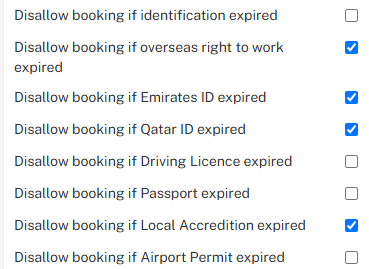
Configuring booking restrictions
Select the relevant checkboxes to prevent staff from being booked when the corresponding compliance requirement has expired.
Identification and Right to Work
- Disallow booking if identification expired – Restricts booking when identification has expired.
- Disallow booking if overseas right to work expired – Restricts booking when an overseas worker's Right to Work has expired.
- Disallow booking if Passport expired – Restricts booking when a passport has expired.
- Disallow booking if Driving Licence expired – Restricts booking when a driving licence has expired.
Local IDs, permits and accreditations
These restrictions relate to country-specific identification, permits and accreditations configured for your organisation. As per the example above:
- Disallow booking if Emirates ID expired – Restricts booking when an Emirates ID has expired.
- Disallow booking if Qatar ID expired – Restricts booking when a Qatar ID has expired.
- Disallow booking if Local Accreditation expired – Restricts booking when local accreditation has expired.
- Disallow booking if Airport Permit expired – Restricts booking when an airport permit has expired.
The available local ID, permit and accreditation restrictions may vary depending on the requirements configured for your organisation.
Overseas Right to Work restrictions
When Disallow booking if overseas right to work expired is enabled, the system checks the worker's recorded Right to Work expiry / next check date to determine whether booking should be restricted.
If no Right to Work check or associated expiry date has been recorded, the system automatically falls back to the worker's visa expiry date.
This means that even where a separate Right to Work check has not yet been recorded, an expired visa can still trigger the booking restriction.
Important: These restrictions must be configured separately for each applicable staff status. Enabling a restriction for one status does not automatically apply it to other statuses.