Compliance overview
Understanding workforce compliance
Managing workforce compliance is essential to ensuring that workers have the correct identification, permissions and documentation required for their roles.
The Compliance section brings these requirements together, helping organisations collect, verify and monitor important worker information while maintaining accurate, centralised records.
From initial registration through to ongoing employment and deployment, compliance information can be managed throughout the worker lifecycle.
What does workforce compliance cover?
The system supports several key areas of workforce compliance:
- Identification – Collecting, verifying and monitoring passports and other identification documents, including expiry dates.
- Immigration status – Recording visa information, immigration permissions and supporting documentation.
- Right to Work – British & Irish – Managing UK Right to Work verification for British and Irish citizens, including integrated digital checks powered by Yoti.
- Right to Work – Overseas – Recording, approving and monitoring UK Right to Work checks for overseas workers.
- Local IDs, permits and accreditations – Managing additional identification, permits and accreditations required for particular countries, locations or roles.
Keeping compliance up to date
Compliance doesn't end once a document has been uploaded or approved. Documents expire, permissions change and additional checks may be required.
The system helps organisations stay informed through:
- Centralised compliance records – Keep important identification, verification and supporting documentation within individual staff profiles.
- Compliance status indicators – Quickly identify missing, pending, approved or expired information throughout the platform.
- Dashboard monitoring – Highlight outstanding verification requirements and documents requiring attention.
- Expiry alerts and notifications – Notify administrators and workers when applicable documents or permissions are approaching expiry.
- Booking restrictions – Prevent staff from being booked onto shifts when selected compliance requirements have expired.
Together, these features provide greater visibility, reduce administrative effort and help organisations maintain a more consistent approach to workforce compliance.
Important: Compliance requirements vary by country, industry and role. Organisations remain responsible for determining which checks are legally required and ensuring that appropriate verification procedures are followed.
Viewing worker compliance information
The worker overview provides a quick and convenient way to view an individual's compliance information, bringing together important identification, immigration, Right to Work and other verification records in one place.
This overview can be accessed throughout the platform using the eye icon, allowing administrators to review a worker's compliance status without navigating through multiple sections of their staff profile.
Understanding the worker compliance overview
The overview displays key compliance information alongside each record's current verification status.
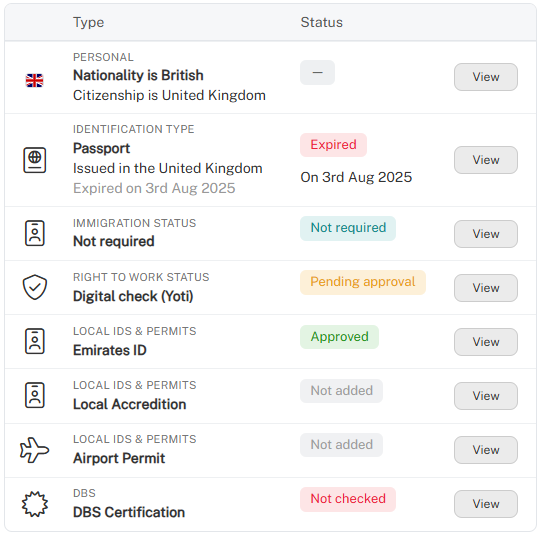
Depending on the worker's requirements, the overview may include:
- Nationality – The worker's nationality and citizenship information.
- Identification – Passport or other identification details, including expiry dates.
- Immigration status – Visa or immigration permission information, where applicable.
- Right to Work – The worker's verification method and current approval status.
- Local IDs and permits – Additional identification, permits and accreditations required for specific locations or roles.
- Other compliance checks – Additional requirements, such as DBS certification, where applicable.
Understanding verification statuses
Each record displays a status to help administrators quickly identify information requiring attention.
- Approved – The information or verification has been approved.
- Pending approval – The record is awaiting review or approval.
- Expired – The document or recorded permission has expired.
- Not added – The required information has not yet been provided.
- Not checked – A verification check has not yet been completed.
- Not required – The requirement does not apply to the individual.
Each record also includes a View button, providing direct access to the relevant information within the worker's staff profile.
This makes the overview particularly useful when reviewing workers during searches, bookings and other day-to-day workforce activities.
Understanding compliance status indicators
Compliance status indicators provide a clear, visual overview of a worker's identification, immigration, Right to Work and other compliance requirements.
These indicators are displayed as status cards at the top of the ID & Right to Work section within each staff profile, allowing administrators to quickly identify missing, pending, approved or expired information.
Viewing compliance status cards
Each card displays the relevant compliance requirement, its current status and any additional information, such as document expiry dates.
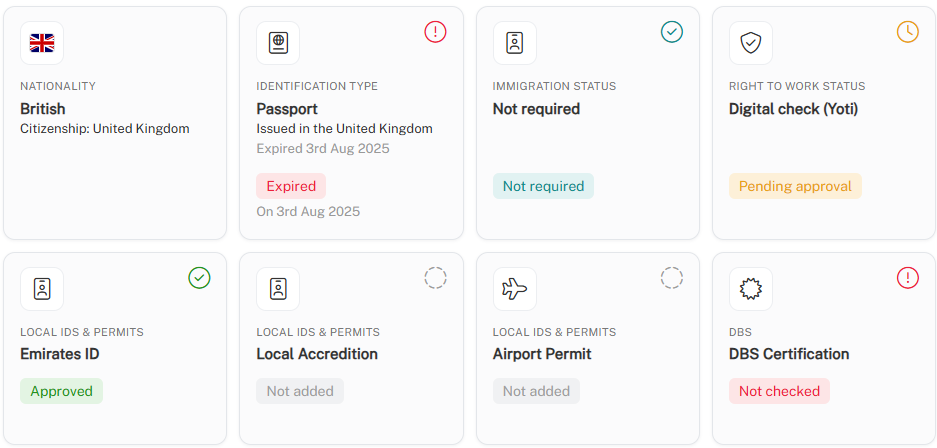
Depending on the worker's requirements, the cards may include:
- Nationality – Citizenship and nationality information.
- Identification – Passport or other identification documents and their expiry status.
- Immigration status – Visa or immigration permission information.
- Right to Work – Verification type and approval status.
- Local IDs and permits – Additional identification, permits and accreditations.
- Other compliance checks – Additional requirements, such as DBS certification.
Understanding the status indicators
Each card uses colour-coded labels and icons to make compliance information easy to understand.
- Green – Approved: The information or verification has been approved.
- Orange – Pending approval: The information is awaiting review or approval.
- Red – Expired or requiring attention: A document has expired or a required check has not been completed.
- Grey – Not added: The information or document has not yet been provided.
- Blue – Not required: The requirement does not apply to the worker.
These indicators allow administrators to identify potential compliance issues at a glance, without needing to review every individual record.